AI Meal Tracker
Snap. Track.
Eat Smarter.
The AI calorie counter that sees what you eat.
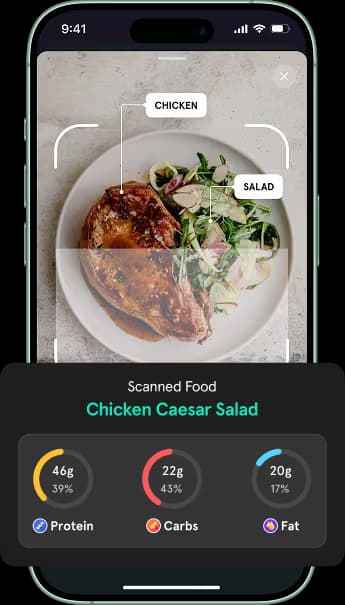
Point your camera at any meal and TrainMate identifies every ingredient, estimates macros, and logs it in seconds. Or just tell the AI chat what you ate — it asks the right follow-ups and logs the meal for you. Scan barcodes, read nutrition labels with OCR, or enter foods manually when you want full control.


How It Works
Why Athletes Choose TrainMate for Tracking
Accurate AI meal tracking
TrainMate doesn't just see "food." It identifies individual ingredients on your plate, estimates portions for each one, and calculates macros that actually reflect what you ate — not a rough guess.
Easy enough to stay consistent
Snap a photo, scan a barcode, or just tell the AI what you ate. With five ways to log a meal — each taking seconds — there's no excuse to skip tracking. Consistency is what drives results.
Barcode & label scanning
Scan any packaged food for instant nutrition data. Point at a nutrition label and OCR extracts the numbers — no typing required.
“I used to spend 10 minutes logging every meal. Now I just take a photo and adjust if needed. It actually identified the tahini in my salad.”
“The barcode scanner is lightning fast and the photo AI nailed my lunch — even picked up the avocado under the eggs. Logging meals went from a chore to a 10-second habit.”
Common Questions
Very accurate for most meals. TrainMate identifies individual ingredients with high precision for common foods — think a bowl of rice with chicken and vegetables. For packaged or mixed dishes, you can always refine the results or use the barcode scanner instead.
Yes. TrainMate includes a barcode scanner that pulls nutrition data from a comprehensive food database. It also supports OCR scanning of nutrition labels for products not in the database.
Both. Every logged meal shows a full breakdown: calories, protein, carbs, and fat. You can view daily and weekly totals, and your nutrition data is integrated with your training and step tracking.
Simple — just type what you ate, something like "I had a chicken wrap with hummus and a side salad." The AI asks follow-up questions about portions, ingredients, and preparation method, then logs the complete meal with macros. It's the fastest option when you can't take a photo.
Absolutely. You can search the food database, create custom food entries, or build saved meals for dishes you eat regularly. Between photo AI, chat AI, barcode scanning, OCR, and manual entry — there are five ways to log food.
Yes. Your nutrition data lives alongside your workouts, steps, and goals inside TrainMate. This means you can see whether your eating supports your training without switching between apps.
Yes — TrainMate offers a free tier that includes meal tracking. Some advanced features require a premium subscription. Download the app to see what's included in the free plan.
Stop guessing. Start tracking.
Download TrainMate and log your next meal in under 10 seconds. Photo, chat, barcode, label, or manual — your call.